 Knowledge Base
Announcements
The Announcements module lets venue admins share updates with customers, schedule messages, and deliver push notifications directly in Thril.
The Announcements module allows venue admins to share updates with customers via the Thril platform. Announcements can be scheduled, targeted, and optionally delivered via push notifications. Customers will see them directly in the Thril interface.
🧭 Overview
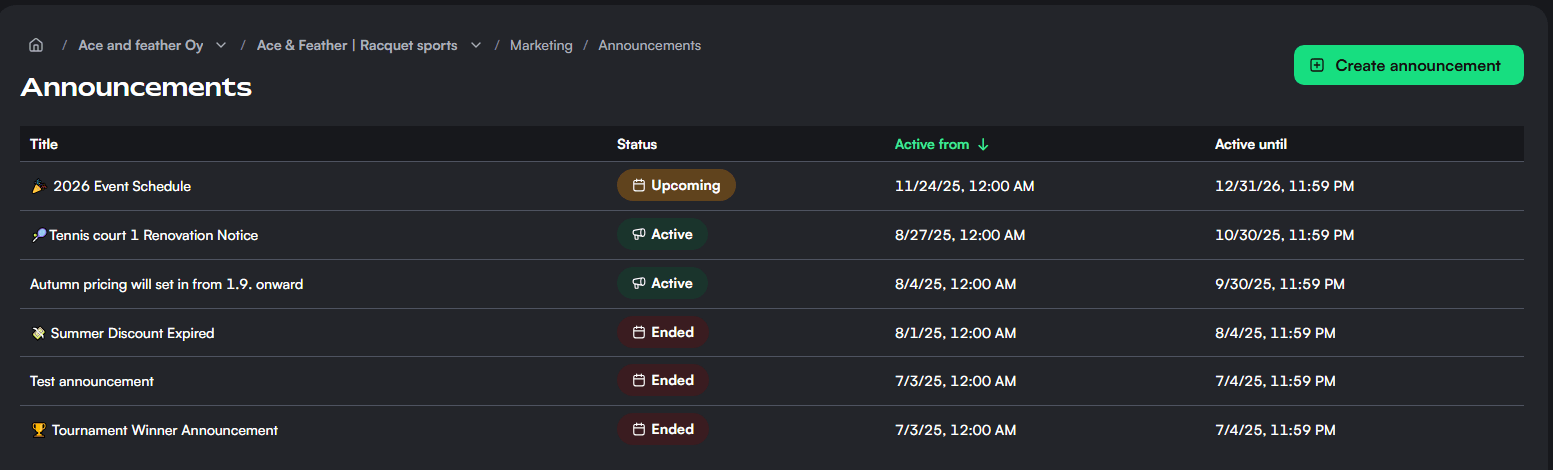
- 🟢 Active: Currently visible to recipients
- 🟡 Upcoming: Will be published automatically at the defined start date
- 🔴 Ended: Announcement period has passed
📋 Announcement Details
Clicking on an announcement opens a detailed view showing:
- Title: e.g. "New Year Event Schedule"
- Active period: Custom date range
- Status: Automatically updates (🔴, 🟡, 🟢 )
- Notifications: Sent or not sent
- Recipients:
- ✅ Included:
alex@example.com,sara.playzone@gmail.com - ❌ Excluded:
john.doe@arcadehub.fi
- ✅ Included:
👀 Preview Tab
This tab shows how the announcement will appear to customers. Rich text formatting is supported for layout, links, and styling.
🛠️ Create a New Announcement
To create a new announcement:
- Click the green “Create announcement” button.
- Enter details:
- Title: e.g. “Power Outage on Nov 12th”
- Content: Full message (with formatting tools)
- Active from/until dates
- Push Notification:
- Enable to alert users via push on mobile/web
- Audience Targeting:
- Everyone
- Or only selected customers
- Note! That you can also create customer lists and select those lists as recipients in this view
✅ Best Practices
- Keep titles short and clear (under 60 characters)
- Always set accurate start and end dates
- For one-time alerts, enable push notifications
- Use recipient filters to personalize critical updates
Session cards
Session cards are prepaid packages that grant customers a set number of reservations, offering flexibility and encouraging repeat visits at your venue.
Authorizations in Thril
Authorizations enable secure collaboration between venues, allowing you to grant and manage permissions for cross-venue operations.