 Knowledge Base
Calendar
The Calendar view gives you a real-time, bird’s-eye view of all bookings, helping you manage and optimize your venue’s daily operations.
Welcome to the control center of your venue operations. The Calendar View in Thril! This is where real-time visibility meets daily coordination, helping you oversee, optimize, and control all your court and facility bookings.
Whether you manage a single court or a multi-sport venue, the calendar provides a bird’s-eye view of your reservations and is one of the most powerful tools to maximize utilization and boost revenue.
🔍 What You’ll Find in the Calendar
The Calendar view is designed to give you an instant, intuitive snapshot of your venue’s daily activity. Here’s what you’ll see:
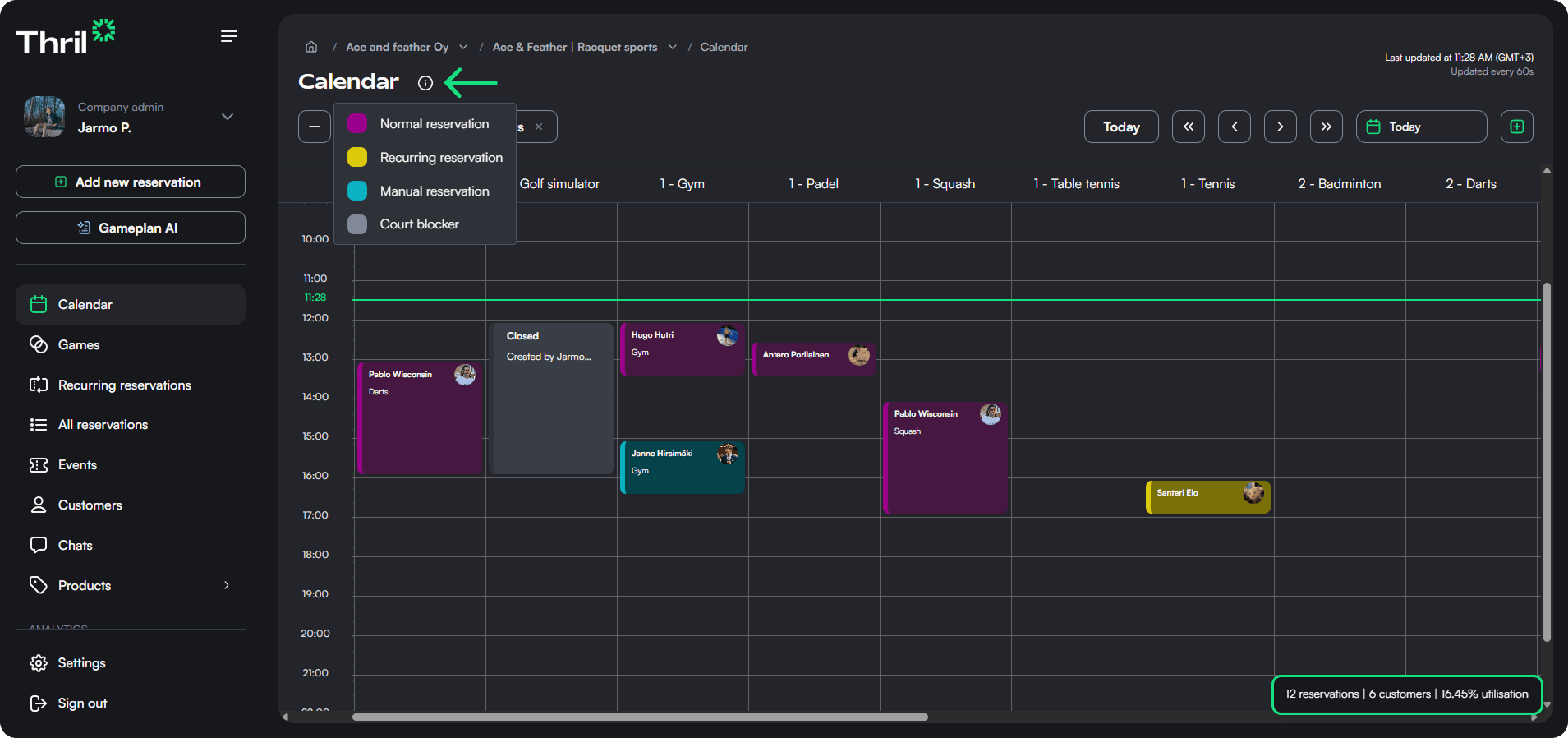
- All sports and courts across the top row Each column corresponds to one of your facilities. These courts follow the names the venue operator has given to them.
- Hourly time slots along the vertical axis This gives you a clean hourly breakdown, so you can easily identify prime-time hours and available slots.
- Color-coded reservations
- Purple: Normal single bookings made by users via Thril app
- Yellow: Recurring reservations
- Blue: Manual reservation made by a venue operator
- Grey: Court blocker (For maintenance etc.)
- Customer and sport tags
Each reservation card includes the customer name and the sport they’re booked for. This way everything is transparent and easy to manage.
✍️ Creating New Reservations
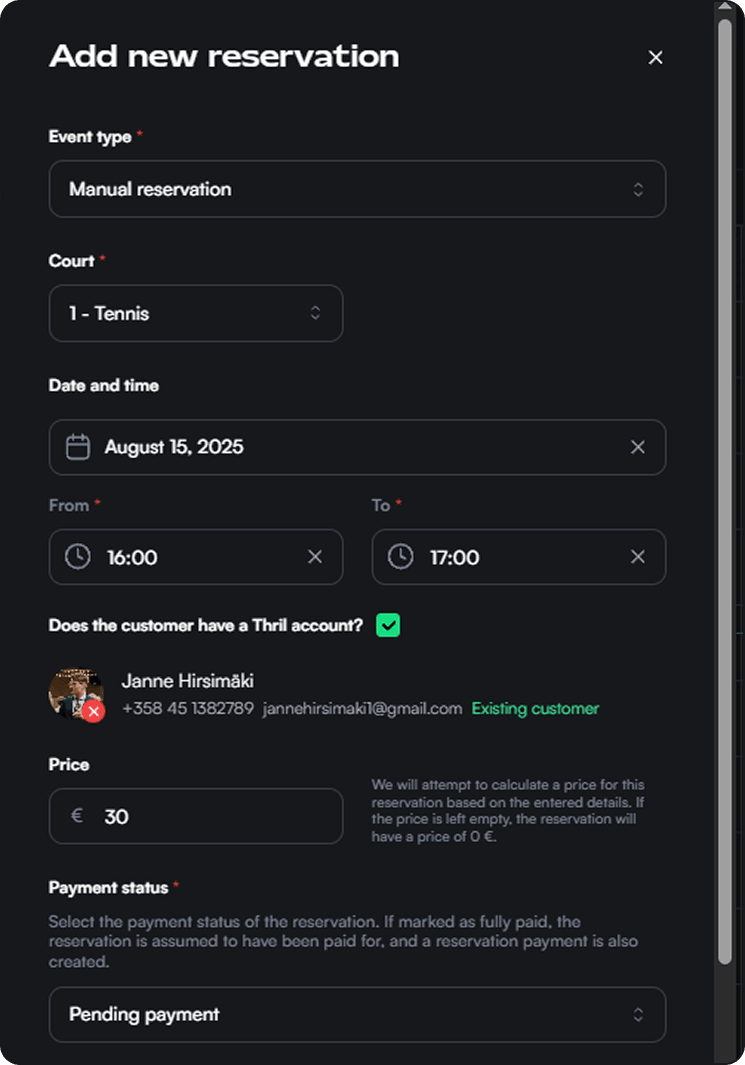
Want to add a new reservation? Just click the green “+ Add new reservation” button.
In the reservation form, you can:
- Select a sport and specific court
- Define the date and time
- Choose a customer (if they already have a Thril account, just type and select)
- Set pricing (automatically calculated when possible)
- Assign a payment status
- Add metadata or tags
🧠 Optimize for Utilization
Here’s how you can use the calendar view not just for management, but also for insight and optimization:
-
Spot quiet hours instantly Dark, empty areas = unused hours. Use this info to offer promotions or partner deals during off-peak times.
-
Track recurring patterns Recurring bookings in yellow make it easy to identify your loyal customers and peak time blocks.
-
Monitor booking activity The bottom right corner has a panel which gives you a quick utilization percentage (e.g., “15 reservations | 12 customers | 35.6% utilization”). Aim for that number to grow by actively managing your venue through marketing. Check out Thril's tool for newsletters!
-
Empower customer service The quick-view cards and detailed pop-ups give staff the tools to answer questions, resolve conflicts, or shift bookings on the fly.
📌 Pro Tips for Calendar Power Users
- Use the "Select multiple slots" tool when booking complex events across courts.
- Click on any reservation to modify, cancel, or inspect its metadata (e.g., payment status, customer contact).
- Encourage your recurring customers (clubs, trainers) to create their own recurring reservations as they’ll show up automatically and are easier to manage than manual entries.
- The reservation details popup has all the information needed about the reservation. You can open it by clicking the reservation to ensure payment, sport tag, and customer data are correct.
🚀 Why It Matters
The Calendar view is more than just a schedule — it’s your operational dashboard. When used right, it helps you:
- Improve occupancy
- Identify trends
- Manage peak hours
- Provide a smoother customer experience
- Act fast and smart with minimal clicks
Let Thril do the heavy lifting while you focus on creating amazing sports experiences.
Branding
Use Thril’s branding tools to shape your venue’s public image, build trust, and boost bookings with a polished, professional profile.
Company profile and admin settings
Configure your company’s details and manage admin rights, ensuring secure and efficient access control for your organization in Thril.