 Knowledge Base
Payments and invoices
Manage all customer payments and invoice generation in one place, with real-time tracking, refunds, and custom invoice creation for your venue.
The Payments & Invoices module in Thril gives venue admins a centralized interface to manage all customer payment activity and invoice generation. Admins can track completed payments, refunds, and create custom invoices with flexible due dates.
📒 Payments Overview
The Payments tab offers real-time insight into all customer transactions.
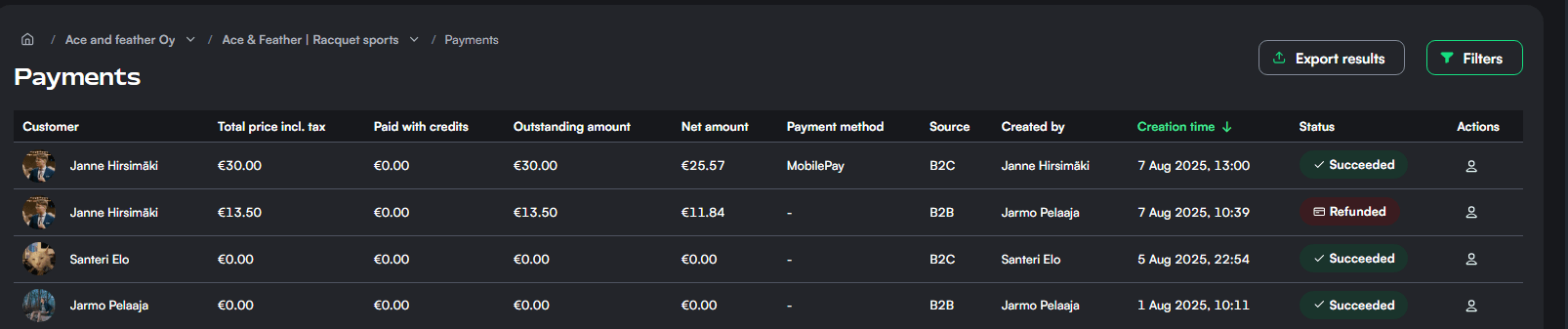
🧾 Example Payments:
- Alex Hunter • €24.00 • Card • ✅ Succeeded • Aug 1, 2025
- Ruby Jacobs • €32.00 • Credits • ❌ Refunded • Jul 31, 2025
- Daniel Evans • €9.00 • MobilePay • ✅ Succeeded • Jul 28, 2025
🧾 Creating Invoices
Admins can generate custom invoices for any registered customer. Invoices include itemized charges, automatic VAT calculation, and optional messages.
🔧 Invoice Fields:
- Customer: Select existing customer
- Invoicing Date: Choose any past/present date
- Days Until Due: Options: 7, 14, or 30 days
- Line Items: Add product/service descriptions, prices, and VAT %
- Invoice Message*(optional)*: Custom message for recipient
📝 Sample Invoice Message:
“Thank you for participating in the Spring League. This invoice is for registration and venue use.”
🟢 When ready, click Create invoice and it will appear in the customer’s billing history.
📊 Summary Tips
- Use filters or export CSV for payment reconciliation.
- Refunded payments are clearly marked and excluded from net revenue.
- Invoice overdue status is tracked automatically
- Admins can view the status at the invoicing dashboard