 Knowledge Base
Discount groups
Discount groups allow you to offer special rates to loyal customers or targeted audiences, supporting member rates, student discounts, and more.
Discount groups are a great way to reward loyal customers, members, or specific audiences with special offers. Whether you're offering member rates, student discounts, or time-based promotions, Thril lets you set it all up with ease.
Here’s how to create and manage discount groups at your venue:
➕ Creating a Discount Group
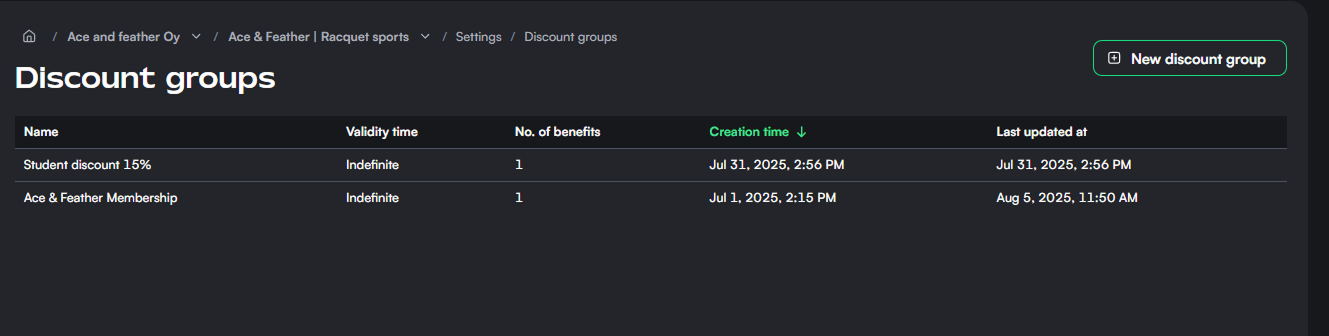
To get started, head to Settings → Discount groups in your venue dashboard. You’ll see an overview of all active discount groups, including their validity and number of benefits.
Click New discount group to begin.
✍️ Step 1: Basic Details
Start by filling in the name and validity of the discount group:
- Name: This is visible to customers and helps them understand what kind of benefit they’re getting (e.g., "Student Membership" or "Evening Promo").
- Validity time: Choose how long a customer’s membership in this discount group is valid. You can set a fixed duration (e.g., 6 months) or leave it indefinite.
Once you’re ready, click Next step.
🎁 Step 2: Define Benefits
Each discount group can include one or more benefits. For every benefit, you'll need to define:
- Benefit name: Clear and simple, like “Student discount” or “Weekend saver.”
- Discount type:
- Percentage: e.g., 15% off total reservation price.
- Fixed amount: e.g., €3 off per booking.
- Discount value: Set the percentage or fixed amount.
You can also add reservation restrictions to fine-tune when and where the discount applies:
- Sports: Choose applicable sports (e.g., only for badminton).
- Courts: Target specific courts.
- Durations: Apply the discount to specific booking lengths.
- Time slots: Limit it to certain hours (e.g., off-peak).
- Date range: Define active periods.
- Days of the week: Choose weekdays, weekends, or specific days like “Saturday & Sunday.”
Want to offer multiple discounts in one group? Click Add benefit to add another.
When you're done, hit Create discount group to save.
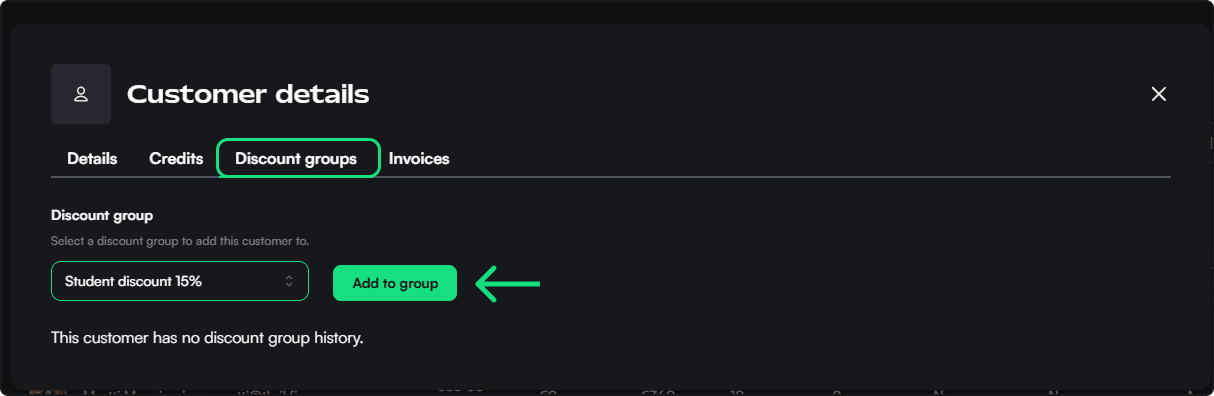
Adding customers to discount groups
- You can add customers to discount groups at the "customers" tab
- Find the customer you want to add
- Click on "Discount groups"
- Add the discount group to the customership
🧠 Tips & Best Practices
- Name discount groups clearly so staff and customers understand the purpose at a glance.
- Combine discounts with your venue’s pricing strategy to drive bookings in quieter hours or days.
- Use fixed-term validity for seasonal or promotional campaigns.
- If you work with schools, local teams, or employers, offer them tailored discount groups for better engagement.
Discount groups are a powerful way to boost loyalty and personalize the customer experience. Once active, customers who are assigned to these groups will automatically see the discounts during booking.
Need help assigning customers to discount groups? Head over to the Customers section in your dashboard.
Customers and customer lists
Manage your customer base, add new customers, and build dynamic or static lists to target the right audience for marketing and communication.
Emails
The Emails module enables admins to create, preview, schedule, and send marketing or transactional emails to customers, with full delivery tracking.