 Knowledge Base
Recurring Reservations
Recurring reservations enable the sale of weekly time reservations as packages, with flexible payment and discount options.
Recurring reservations allow a sports venue to sell recurring weekly time reservations as packages. This is ideal for clubs, groups, or individuals who want to purchase regular playtime over a longer period (e.g., every Monday from 17:00–18:00). The reservations are sold as a package and can be paid either per session or upfront with discounts.
With Thril, this is easy: you define the reservations, and customers take care of the rest. Convenient and clear!
🔧 Creating a New Recurring Reservation
Create a new recurring reservation product as follows:
- Go to Products → Recurring Reservations
- Click Create recurring reservation

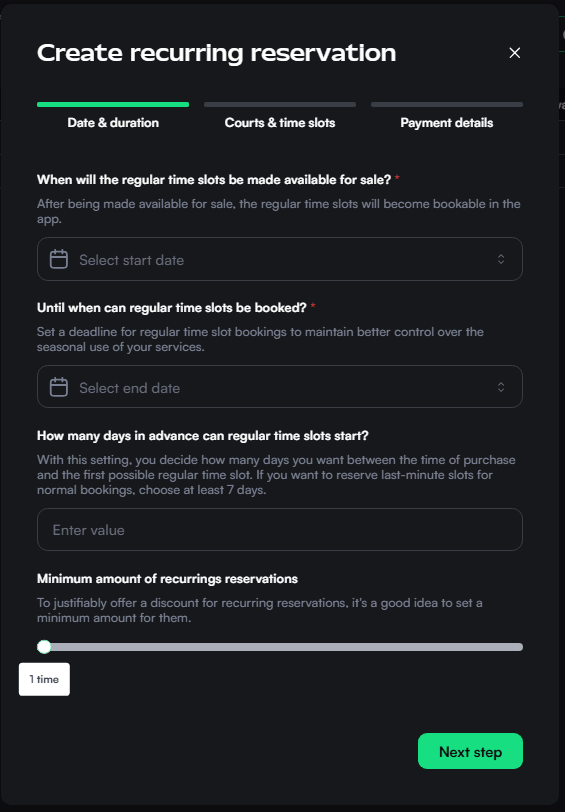
Step 1: Date and Duration
- Booking window: Define the period during which reservations can be purchased (start and end date).
- Advance purchase delay: Decide how many days must pass between purchase and the first reservation. If you want to leave last-minute times for normal bookings, select at least 7 days.
- Minimum quantity: Set the minimum number of purchases allowed (e.g., 3 times = 3 weeks).
Step 2: Courts and Times
- Sport(s): Select the sport related to the recurring reservation.
- Courts: Define on which courts the reservations will take place.
- Weekdays and times: For example, Monday, Wednesday 12:00–16:00.
- Durations: Allow booking lengths (e.g., 60 min).
Step 3: Payment and Pricing
-
Payment options:
- Pay per session – customer pays weekly (requires billing information)
- Pay upfront – the whole package is paid in advance
- Both – customer can choose at checkout
-
Discounts: Thril calculates the total price from normal rates. You can give overall discounts in euros, and the discount amount may vary depending on package price and length.
-
Price rules:
- You can add multiple price rules that apply discounts
- Minimum price
- Minimum number of bookings
- Discount value
-
Internal name: Add an administrative name (e.g., “Monday Afternoon Badminton Reservation”).
👉 Once saved, the recurring reservation product will appear in the store if it is marked as active.
✏️ Editing and Managing Existing Recurring Reservations
-
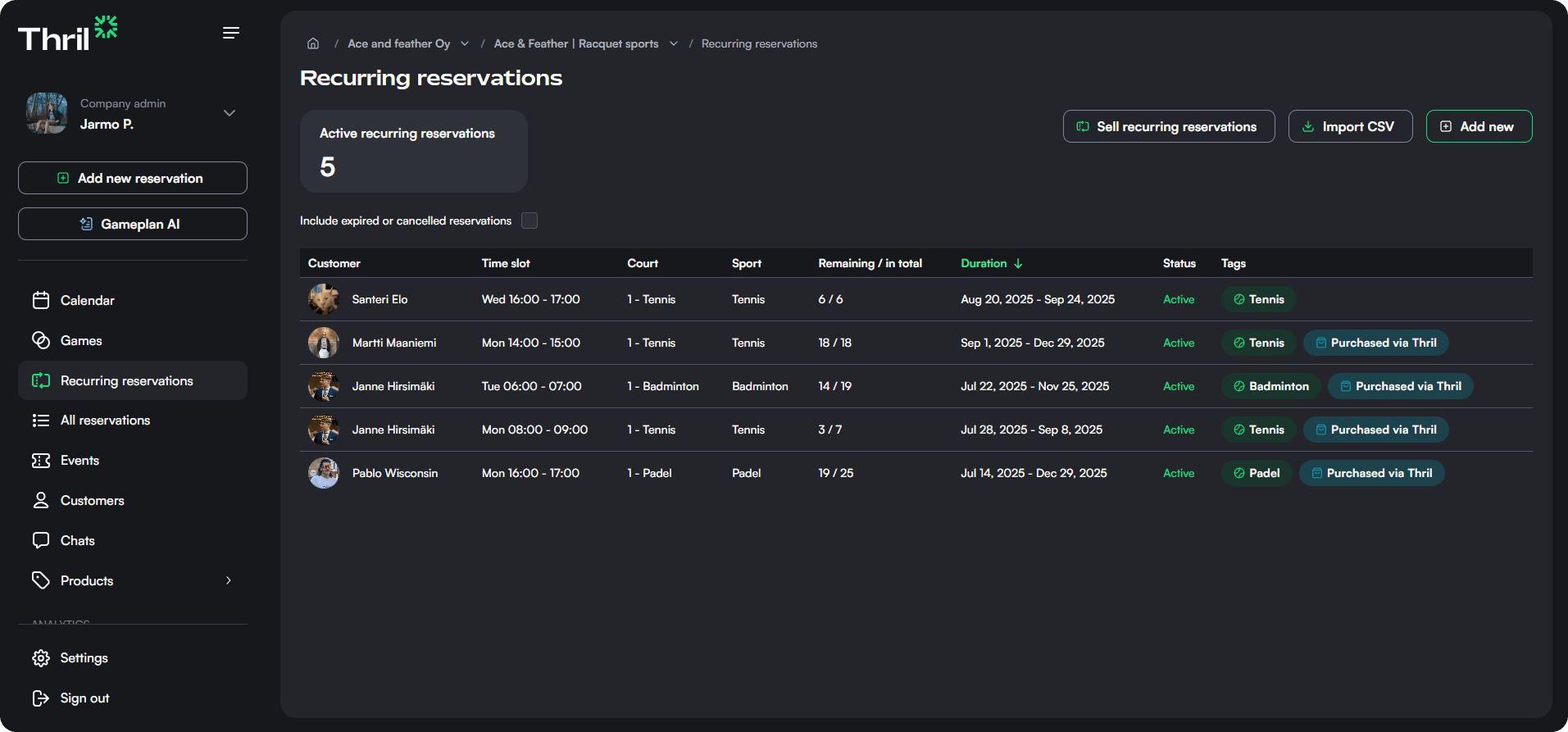
You can find recurring reservations under Products > Recurring Reservations
-
Click a row to open details:
- All settings: courts, durations, pricing, etc.
- A list of customers who have purchased the reservations, along with their times
-
Use Edit recurring reservation to update settings
-
Click Delete recurring reservation if you want to remove the product
⚠️ Note: Changes do not apply retroactively to customers who have already purchased the product.
🧾 Purchase View
From the Purchases tab of each recurring reservation, you can see:
- Customer names
- The reservations reserved for them
- Court and sport
- How many reservations are left from the package
- A button back to "Sales view"
This makes it easy to check who has the right to which recurring reservations.
🗣️ Recurring Reservation Description
You can add text to the recurring reservation description that appears in the store. This lets you inform customers about:
- Which reservations are available
- Special instructions or announcements (e.g., “Autumn season reservations now available”)
Keep the text up to date when adding or removing reservations to avoid customer confusion.
✅ Tips for Best Practices
- Minimum duration: Add at least 3 reservations so that customers don’t buy just one or two and still expect recurring benefits.
- Pricing: Based on the existing price lists for the sport and time reservations.
- Advance purchase delay: Use at least 7 days to keep last-minute bookings separate from recurring reservations.
- Pay upfront discounts: Encourage customers to pay the whole package in advance to ensure secure cash flow.