 Knowledge Base
Cover and profile images
Make your venue shine with the right images.
Your profile and cover images are the first thing customers notice. A well-chosen visual creates a strong first impression, communicates professionalism, and helps people instantly recognize your venue. Let’s walk through how to set them up for the best results.
🖼 Upload a Great Cover Image
Your cover image is the largest element of your profile and sets the tone for your brand.
- Aspect ratio: Always use 16:9 for the best display.
- Resolution: We recommend 2560 × 1440 px for sharpness on all devices.
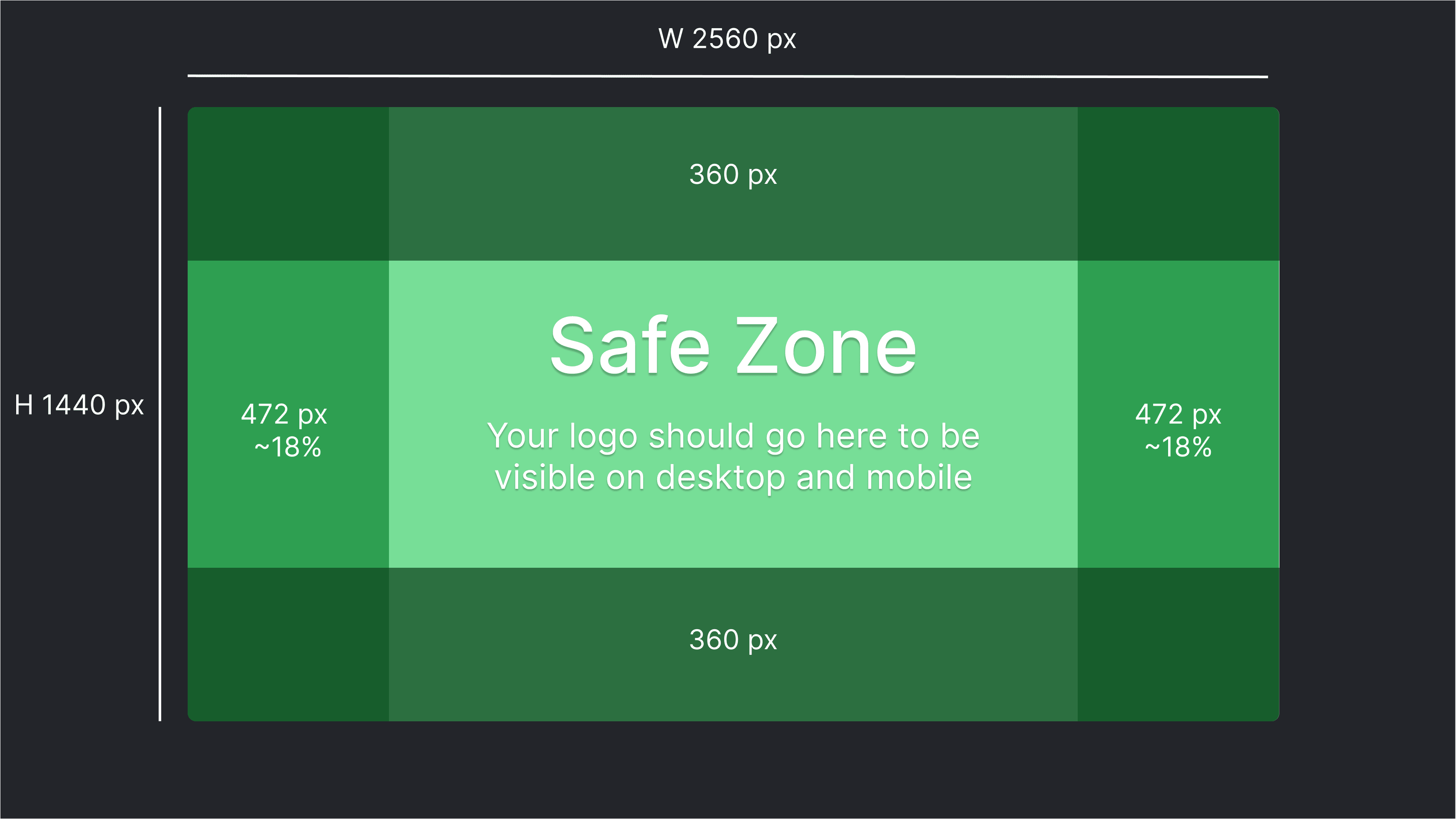
- Empty space: Leave 15–20% padding on the left and right sides of the image. This prevents important details from being cropped on different screens.
- Top & bottom padding: Keep about 20–25% of the height free from critical elements.
- What works well: Wide shots of your venue exterior, atmosphere photos, or clean, inviting visuals that reflect your brand.
💡 Pro tip: Avoid placing text or logos near the edges. They may not be visible on smaller screens.
You can use this photo as a guideline!
🪪 Add a Clear Profile Image
Your profile image is shown in lists, maps, and search results. We recommend using a photo that is instantly recognizable.
- Format: Square (1:1 ratio).
- Content: Use your venue’s logo or a clean, centered photo of your space.
- Resolution: Choose a high-quality image so it doesn’t appear blurry.
💡 If you don’t have a logo yet, consider using a simple, clean shot including your sport.
🎯 Place Your Logo in the Safe Zone
When using your cover image with a logo overlay:
- Keep your logo centered within the safe zone.
- The safe zone is the middle rectangle of your image
- This ensures visibility across both desktop and mobile.
- Check that your logo is high resolution so it looks crisp.
- Make sure there’s enough contrast between the logo and the background for easy readability.
For example:

🔍 Preview Before Saving
After uploading, always use the preview tool:
- Check how your images look on consumer pages on desktop and mobile.
- Verify that your logo is visible and easily readable.
- Adjust brightness, contrast, or cropping if needed.
🧠 Why Great Images Matter on Thril
Images are the quickest way to build trust and recognition. A polished cover and profile photo:
- Increases your venue’s visibility in search results
- Help customers recognize your brand instantly
- Set the tone for a professional and welcoming experience